Miko 3 AI Robot
Your five-year-old started asking Alexa real questions and you thought: there must be something better. Miko 3 is an AI robot that tries to be that thing. It partly succeeds, but only with the subscription, only on Wi-Fi, and only if your child speaks clearly enough for it to hear.
Ages 5 to 10 (realistically 5 to 7)
Your child has started talking to Alexa. Not asking for the weather. Actually talking. Asking why the sky is blue, whether dinosaurs could swim, what happens when you die. You watched this happen and thought: there must be something designed for children that does this properly. Something that answers their questions without accidentally playing explicit music or reading out your shopping list. So you typed "AI robot for kids" into a search engine, and now you're looking at Miko 3.
That instinct is sound. The question is whether Miko 3 is the right answer to it.
What it is
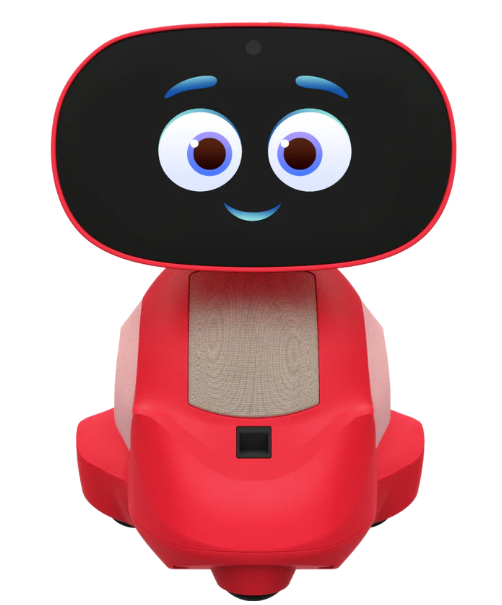
Miko 3 is a small plastic robot, about nine inches tall and two pounds, with a 4.5-inch touchscreen for a face, a camera, a pair of microphones, and three wheels on its base. It connects to your home Wi-Fi and runs a combination of built-in apps, conversational AI, and subscription content. It is marketed for children aged five to ten.
The robot comes in red or blue. In the box you get the robot itself, a USB-C charging cable, and a quick-start guide. You will also need to download the Miko Parent App on your phone.
In the UK, Miko 3 is available through Amazon at around £230 to £260, depending on the seller and whether there's a sale running. It is also listed on eBay UK, sometimes at slightly lower prices for open-box units. The robot is primarily a US product, so UK availability can be patchy. Check stock before committing. On top of the hardware cost, there is an optional but practically essential subscription called Miko Max, which runs at roughly $99 per year (about £80). More on why that matters shortly.
The first session
Set this up before your child sees it. That is not a suggestion. It is the single most important piece of advice in this review.
The initial setup involves charging (allow around four hours with the included cable), connecting to Wi-Fi, running system updates, creating a child profile, and pairing the parent app. Expect this to take at least thirty minutes, and possibly longer if updates are large. Your child will not sit patiently through this. Nobody would.
Once it is running, the home screen is Miko's face: blinking, expressive, responsive to taps. Your child can say "Hey Miko" to start a conversation, or tap the screen to explore apps. The first few interactions are guided: Miko introduces its features, demonstrates its ability to dance and tell jokes, and walks the child through its various modes. Within the first hour, most five- and six-year-olds will be entertained. Whether they are still entertained in week three depends on what you've paid for.
What it's genuinely good at
The concept works. A small, friendly-looking robot that responds to your child's voice, remembers their name, and reacts with facial expressions on its screen creates something a tablet simply does not: a sense of companionship. Children do treat Miko differently from a screen. They talk to it, show it things, ask it to dance. That emotional engagement is real, and for some children, particularly those who are naturally curious and verbal, it sustains interest over weeks and months.
The parent app is well designed. You can set time limits, lock individual apps, monitor what your child has been doing, and make video calls directly to the robot. For a parent who worries about unsupervised screen time, the level of control here is a genuine selling point.
With the Miko Max subscription, the content library becomes substantial. Disney stories, Kidoodle.TV, DaVinci Kids science content, coding activities, yoga, and interactive games. A child who enjoys being read to, or who likes structured learning activities, will find plenty to keep them engaged. The subscription content gets monthly updates, which helps with the novelty problem that plagues most electronic toys.
Miko also supports eight languages, which makes it a genuinely useful tool for bilingual households or families who want their child to hear a second language spoken conversationally.
Before you open the box
The subscription question is the big one, so let's address it first. Without Miko Max, the built-in content is thin. You get a spelling game, a couple of limited-access story and learning modules, and the conversational AI. That is not enough to justify the hardware price on its own. Most families will need the subscription to make Miko feel like a complete product rather than a demo unit. Budget accordingly: the real cost of Miko 3 in its first year is not £230 but closer to £310.
That said, Miko Max content is also accessible through the phone app, so your child can use it on a tablet or phone as well as on the robot. If you are already paying for a children's content subscription elsewhere, consider whether this replaces it or adds to the bill.
The conversational AI is the feature most parents are buying Miko for, and it is the feature most likely to disappoint. It works. Your child can ask questions and get answers. But the responses are slow compared to what adults are used to from ChatGPT or Alexa, and the speech recognition struggles with unclear pronunciation or background noise. If your child has any kind of speech delay or speaks quietly, the AI may not understand them reliably. For a confident, clearly-spoken seven-year-old, it works well enough. For a mumbling five-year-old in a noisy kitchen, expect frustration.
The battery claims vary depending on who you ask. Miko says six to seven hours of active use with the latest firmware; independent reviewers consistently report closer to four or five. More importantly, the standby battery drain is a recurring complaint. If your child uses Miko in the evening and you turn it off at fifty percent, it may well be dead the next morning. The practical fix is simple: keep it on the charger overnight, every night. It is not ideal, but it works.
Wi-Fi connectivity is generally stable once set up, but the initial connection can be fiddly. Some parents report difficulty getting the robot to find their network at all. Miko needs to be within about five metres of your router and requires a minimum of five megabits per second. If your Wi-Fi is unreliable or your child's bedroom is far from the router, this could be a problem. Most content requires an internet connection, and offline functionality is very limited.
One thing that surprised several reviewers, and is worth knowing: your child will probably end up using Miko primarily as a small tablet on a stand. The wheels work, the robot can dance and scoot around a table, but the subscription content, which is the strongest part of the experience, does not use the robot's mobility at all. Your child will sit Miko on a table and watch stories or play games on its screen. This is not necessarily a bad thing, but if you are imagining a robot companion that follows your child around the house, that is not what Miko 3 does.
The verdict
Miko 3 works best for a child aged five to seven who enjoys being talked to, read to, and gently entertained, the kind of child who asks lots of questions and likes having a "friend" to interact with. For that child, especially with the Max subscription, Miko offers something genuinely different from a tablet: a sense of personality and engagement that keeps the experience from feeling like passive screen time.
For older children, eight and above, the appeal fades. The content skews younger, the AI is not sophisticated enough to hold an older child's attention, and they will quickly realise they are using a small, slow tablet in a plastic body. If your child is already comfortable with a regular tablet, Miko may feel like a step backwards.
For a child with speech difficulties or who is very quiet, the voice recognition may be a source of persistent frustration rather than fun. Test the thirty-day return window early if this applies to your situation.
If budget is a concern, be honest about the total cost. The robot plus subscription plus potential replacement chargers or accessories puts you well north of £300 for the first year. A children's tablet with a robust case and a good educational app subscription will cost less and do more, albeit without the robot personality. The question is whether that personality, the blinking face, the dancing, the sense of a companion rather than a device, is worth the premium to your child. For some children, it absolutely is.
And if your child just wants something that moves around and makes noise without setup, subscriptions, or Wi-Fi, a remote-control car remains an underrated option.